
Logistics Support Analysis (LSA)
At Techpoint Services, our Logistics Support Analysis (LSA) capability ensures systems are designed and maintained with maximum supportability, operational efficiency, and cost-effectiveness throughout their lifecycle. We apply a structured, standards-driven approach to identify support requirements, develop maintenance strategies, and enhance readiness. Our work is guided by internationally recognized standards and supported by advanced LSA software tools to deliver accurate, compliant, and actionable logistics data.
LSA Standards we use
Our LSA processes adhere to key international and defence standards to ensure consistency, interoperability, and compliance across all deliverables:
- MIL-STD-1388 – The foundational U.S. military standard defining logistics support analysis requirements and data structures.
- Def Stan 00-600 – The UK Ministry of Defence standard for Integrated Logistic Support (ILS), covering analysis, planning, and data management.
- S3000L – The ASD specification that defines the process for performing Logistic Support Analysis throughout the product lifecycle.
- GEIA-STD-0007 – The industry standard for the structure, management, and exchange of Logistics Product Data (LPD).
By aligning with these standards, we ensure our LSA outputs are compliant, interoperable, and suitable for integration into defence and aerospace support environments.
LSA Software we use
To deliver precise and reliable LSA data, our team leverages a suite of industry-recognized tools designed for logistics modelling, data management, and integration:
- EAGLE LPD – For developing and managing logistics product data compliant with S3000L and GEIA-STD-0007.
- OmegaPS – For comprehensive logistics analysis, supportability assessments, and data modelling.
- Microsoft Access – For structured data management, reporting, and tailored database solutions.
- L-Base – For integrated supportability analysis and lifecycle data management.
- SQL Developer – For advanced database queries, integration, and data transformation.
These tools enable us to efficiently manage complex datasets, ensure compliance with multiple standards, and deliver LSA data that seamlessly integrates into client systems.
Enhance Your Supportability
Learn more about how our Logistics Support Analysis (LSA) services can strengthen your program’s supportability, reduce lifecycle costs, and improve operational readiness.
LSAR Review Tool
The LSAR (Logistic Support Analysis Record) review tool is a comprehensive tool designed to thoroughly examine each table within an LSAR, ensuring adherence to the rigorous standards set by DefStan 00-600 or Mil-Std 1388. This tool goes beyond basic validation, performing over 100 checks to verify the accuracy and compliance of the data within the LSAR.
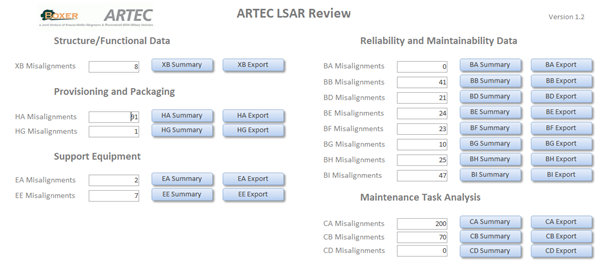
After interrogating the LSAR data, the tool meticulously analyzes it against the specified standards, detecting any discrepancies or errors. These errors are then compiled into a detailed list, which is conveniently exported to Microsoft Excel, providing a structured overview of the issues identified.
What sets this LSAR review tool apart is its adaptability. Users have the flexibility to customize the tool according to the specific requirements of their project. This includes tailoring the tool to align with a project user guide and incorporating additional automated checks to enhance the precision and thoroughness of the analysis.
Currently implemented by industry leaders such as Artec GmbH and Babcock, the LSAR review tool exemplifies a commitment to maintaining the highest standards in logistics support analysis. Its robust functionality not only ensures compliance with established standards but also facilitates project-specific adaptations, making it a valuable asset for organizations seeking precise and efficient LSAR validation processes.
Flatfile to LSAR comparison database
The two-part tool is a sophisticated solution for data manipulation and analysis, offering enhanced capabilities in managing flat files, typically in .txt or .dat formats. In its initial phase, the tool executes a batch (.bat) file to perform a meticulous separation of the flat file into distinct tables. This process ensures that data, initially consolidated within a single file, is now organized into discrete units, laying the foundation for more structured and comprehensible information.
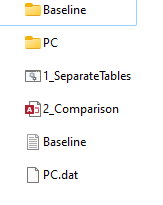
The second part of the tool is intricately linked to the output generated by the first phase. This component provides a dynamic interface that allows users to view each table in a database format. The database view facilitates a comprehensive examination of the data, enabling users to analyze, modify, and interpret information efficiently. The tool's design prioritizes user-friendly interactions, empowering users to make informed decisions based on the organized data.
One notable feature of the tool is its capacity to compare against separate flat files. This functionality extends its utility beyond data organization, enabling users to identify differences, similarities, or inconsistencies across multiple datasets. Whether conducting a detailed analysis of individual tables or comparing data from disparate sources, the tool's versatility makes it an invaluable asset for those requiring nuanced control over their data management processes. Its ability to seamlessly handle and analyze data in various scenarios positions it as a powerful tool for users seeking comprehensive solutions for data manipulation and comparison.
For more information